
Views: 0 Author: Site Editor Publish Time: 2026-05-11 Origin: Site
You might see your smartwatch battery runs out fast. This is because smartwatches have small batteries and strong features. Features like heart rate tracking, GPS, and bright screens use lots of power. Your watch also connects to your phone all the time. These things make smartwatch battery life shorter than regular watches.
Smartwatches use small batteries, usually from 130 mAh to 410 mAh. This means you need to charge them often. Power-hungry features like GPS and bright screens use a lot of battery. You may need to charge your smartwatch every day or every other day. Background tasks like app syncing and heart rate checks also use up battery faster. Picking a smartwatch with a good operating system and display can help the battery last longer. You can save battery by lowering screen brightness and turning off some notifications. These habits help your smartwatch last longer between charges.
You might see your smartwatch needs charging more than your phone. This is because smartwatches have very small batteries inside. Most popular models use batteries from 130 mAh to 410 mAh. These batteries are much smaller than the ones in smartphones. The watch is small, so only a tiny battery fits inside. Because of this, you need to charge your smartwatch every day or every other day.
Note: Fitness bands can last much longer, sometimes up to three weeks, because they use less power and have simpler displays. But tech smartwatches with more features usually last only 18 hours to two days.
Smartwatches have many features, but these use a lot of energy. Bright, always-on displays and strong processors use the most power. The display can use up to 30% of all the power. The CPU uses about 29%. If you turn on GPS or heart rate monitoring, the battery drains even faster. For example:
Multi-band satellite GPS gives better accuracy but uses more power.
Continuous heart rate monitoring can drain the battery in a few hours.
GPS tracking and heart rate monitoring are two big reasons for fast battery drain.
Feature | Power Consumption (%) |
|---|---|
CPU | 29% |
Display | 30% |
Bluetooth/WiFi | 3.5% |
You can see the display and processor use the most power. This is why battery technology in smartwatches is very important.
Many background functions run all the time on your smartwatch. These include GPS tracking, workout logging, and heart rate monitoring. Always-on displays also use power. Other things like app syncing, voice assistants, and automatic updates keep working too. Each one makes the battery drain faster.
GPS tracking
Workout logging
Continuous heart rate monitoring
Always-on display
App syncing
Voice assistants
Automatic updates
Connectivity features like Bluetooth and Wi-Fi also drain the battery. These let your watch talk to your phone and other devices. If Bluetooth or Wi-Fi stays on or keeps searching, the battery drains even faster. This constant connection is a big reason why smartwatch battery life is shorter than you think.
If you want your smartwatch battery to last longer, you need to know how these background functions and features use power. Picking a watch with better battery technology can help, but learning how to manage these features is just as important.
The operating system on your smartwatch affects battery life a lot. Some systems, like Google's Wear OS, use more power. They run many features in the background. These features include interactive watch faces, voice assistants, and app syncing. If you use a Wear OS watch, the battery usually lasts less than a day. Even battery-saving modes do not help much.
Samsung made Tizen as another option to Wear OS. Tizen works well with Samsung's hardware. This means you get longer battery life. Many Tizen watches last two or three days on one charge. Apple controls both hardware and software on its watches. This helps them manage battery use better. When a company designs both parts, it can make the watch use power more wisely.
Some software features use more battery than others. You can see this in the table below:
Feature | Impact on Battery Consumption |
|---|---|
Heart Rate Monitoring | High |
Step Tracking | Moderate |
Active Sensors | High |
InfiniTime OS | More Energy-Efficient |
Wasp-os | Less Energy-Efficient |
If you use heart rate monitoring or active sensors all day, the battery drains faster. Picking a watch with an efficient operating system helps you use it longer between charges.
The display type on your smartwatch matters for battery life. AMOLED screens look bright and colorful. They use less power than LCD screens when active. LCD screens need backlighting. This drains the battery faster and limits always-on display features. E-ink displays use very little power. They can last for weeks but do not show colors well.
Here is a quick comparison:
Display Technology | Battery Life | Power Consumption Characteristics |
|---|---|---|
AMOLED | 1-2 days | 15-25% less power during active use compared to LCD |
E-Ink | >14 days | Inherent low power consumption, ideal for endurance applications |
LCD | 1-2 days | Higher overall battery drain due to backlighting, limited always-on functionality |
Tip: If you want a watch that lasts longer, pick one with an e-ink display or an efficient AMOLED screen. Always-on displays look nice, but they use more battery.
You can make your smartwatch last longer by picking the right operating system and display technology. These choices are as important as battery size.
When you look at different smartwatches, you see battery life is not the same. Some brands last longer than others. Apple, Samsung, and Garmin watches show this difference.
Brand | Model | Battery Life (Normal Use) | Battery Life (Low Power Mode) |
|---|---|---|---|
Samsung | Galaxy Watch 5 | Up to 50 hours | Up to 131 hours (5.5 days) |
Garmin | Fenix 7 | Up to 22 days | Up to 173 days |
Apple | Apple Watch Ultra | Up to 36 hours | Up to 60 hours |
Watches with bright AMOLED screens and lots of sensors use more battery. These features make the battery run out faster. Simpler watches with basic screens and fewer sensors last longer. You have to choose what is more important to you: cool features or a battery that lasts longer.
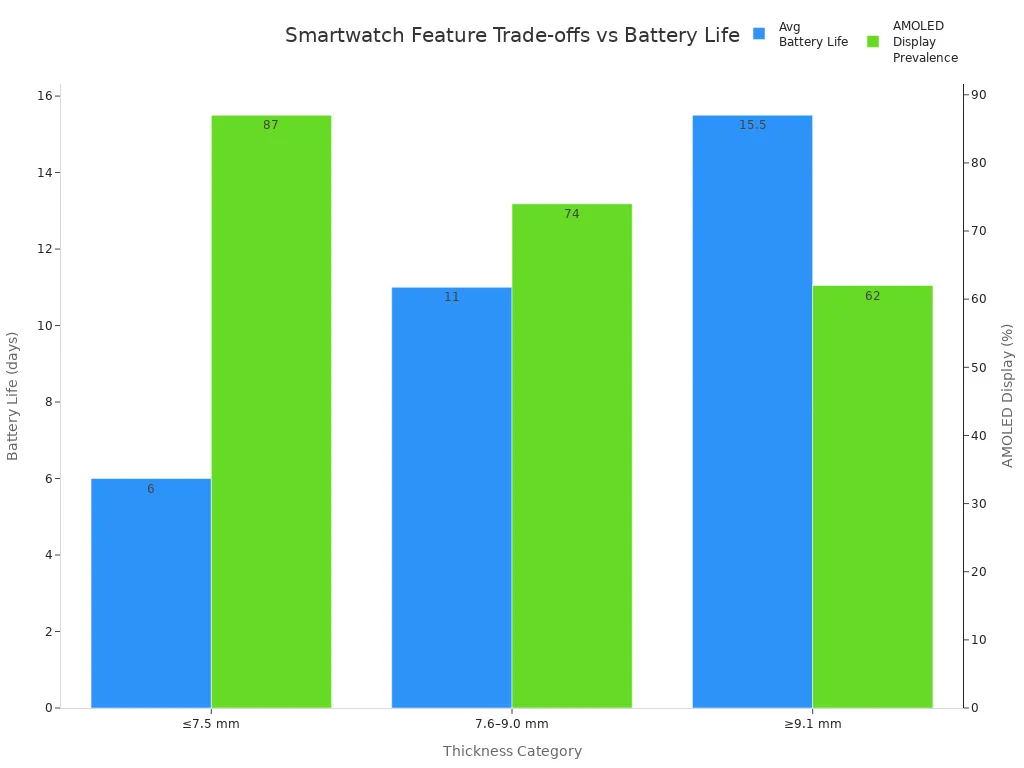
Thickness Category | Average Battery Life | Built-in GPS | ECG Availability | Water Resistance | AMOLED Display Prevalence |
|---|---|---|---|---|---|
≤7.5 mm | 5–7 days | None | Rare | IP67 or IP68 | 87% |
7.6–9.0 mm | 8–14 days | ~30% | ~20% | 5 ATM | 74% |
≥9.1 mm | 10–21 days | ~92% | Standard | 5–10 ATM | 62% |
If you want a watch for hiking or camping, pick one with fewer features that use a lot of power.
Some smartwatches last longer because of smart design. Garmin uses solar charging and special screens that save power. Their watches can last for weeks. For example, the Garmin Enduro 3 can work for up to 36 days. Simple watches like the Kospet Tank Series or Amazfit GTR also last a long time. They use basic software and do not have many sensors.
Model | Claimed Battery Life (Typical Use) | Key Technology | Ideal For |
|---|---|---|---|
Garmin Enduro 3 | 36-90 days | Solar Charging, Power Manager | Ultra-marathoners, multi-day hikers |
Kospet Tank Series | 15-20 days | Ruggedized Build, Basic OS | Outdoor workers, extreme sports |
Amazfit GTR Series | 14-24 days | Balanced OS, Efficient Chipset | Everyday users wanting good value |
Tinymoose Tempo | Up to 15 days | Optimized OS, Smart Power Modes | Users wanting style, features, and practical battery life |
Apple Watch Ultra 2 | 36-72 hours | Low Power Mode, Efficient S9 SiP | Apple users needing extra durability & battery |
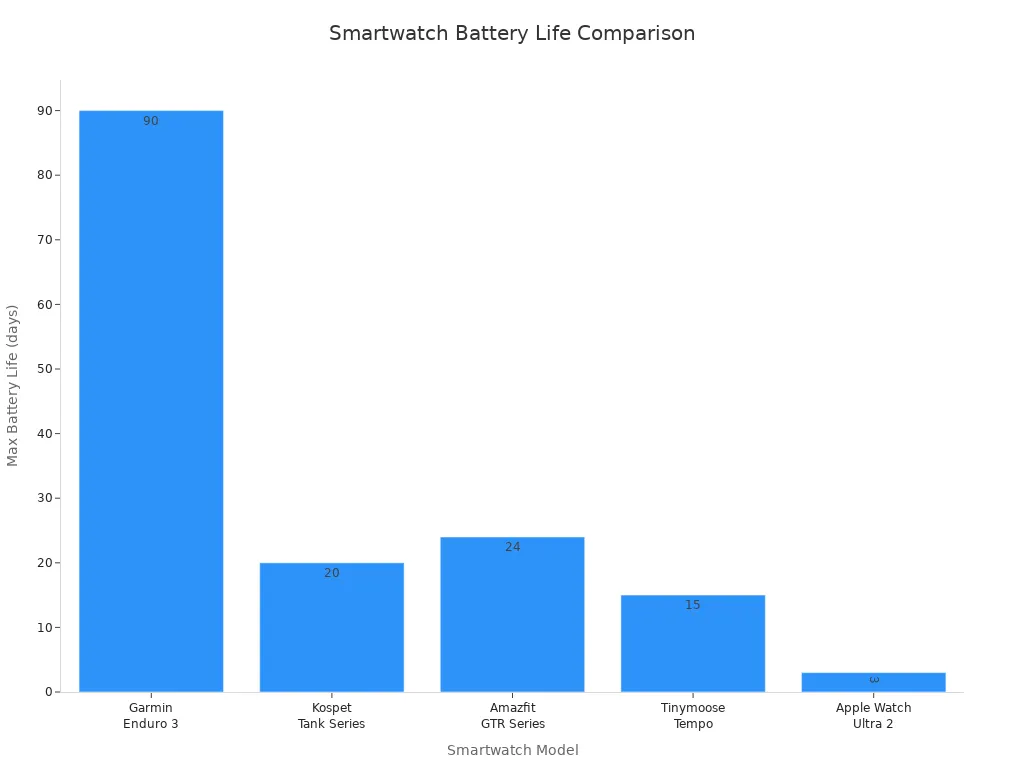
Remember, companies test battery life in perfect labs. In real life, you turn up the brightness and get lots of alerts. This makes the battery die faster. If you want your watch to last longer, pick one with fewer features, a screen that saves power, and smart software.
If you want your smartwatch to last longer, you need to know what to check before buying. First, look at the battery capacity. This is measured in milliampere-hours (mAh). A bigger mAh number usually means the battery lasts longer. But you also have to think about how much power the watch uses. Watches with GPS or bright AMOLED screens use more energy.
Try to find watches with battery-saving modes. These modes help the battery last longer by turning off things you do not need. Fast-charging is also helpful if you do not have much time to charge. Some watches use lithium-ion batteries. These batteries are safe and hold a lot of energy. You should also see if the watch has higher voltage batteries, like 3.7V or 4.2V. These can power more features and still last a long time.
Tip: To guess how long your battery will last, use this formula:
Estimated Run Time (hours) = Battery Capacity (mAh) / Device Current Consumption (mA)
You can make your smartwatch battery last longer by changing some settings and habits. Try these ideas:
Set the screen to turn off quickly and use low brightness.
Turn off the always-on display. This helps the battery last much longer.
Pick battery-saving watch faces and turn off heart rate broadcasting if you do not need it.
Only let important apps send you notifications. Too many alerts use up the battery.
Turn off background app refresh and music streaming if you do not use them.
Use Low Power Mode to turn off Wi-Fi, cellular, and other things that use a lot of power.
Charge your watch to about 90% instead of 100%. This helps the battery last for years.
Common Mistake | Why It Hurts Battery Life |
|---|---|
Using all features at once | GPS, workout logging, and always-on display use lots of power |
Too many notifications | Frequent syncing and alerts drain battery fast |
Ignoring power-saving modes | Not using these means shorter battery life |
If you follow these steps, your battery will last longer and you will not need to charge your watch as much. Good choices and smart habits help you get the most from your smartwatch battery.
Now you know why smartwatch batteries do not last long. The small size and slow battery improvements make them run out fast. Many features use a lot of power, too. Most people want their watch to last all day. But they have to charge it often. If you learn what uses up the battery, you can pick a watch that works for you. You can also use smart habits to make your battery last longer.
Remember: Changing your settings and choosing the right features can help your smartwatch last longer.
Future Trend | What It Means for You |
|---|---|
Enhanced Energy Density | You can use your watch longer before charging |
Innovative Battery Tech | Your smartwatch will be safer and work better |
Sustainability Focus | Watches will use eco-friendly materials and ways to make them |
Your smartwatch needs power for its screen and sensors. It also uses power to stay connected to your phone. GPS and heart rate monitoring use even more battery. If you turn off features you do not need, your battery will last longer.
You can change settings like screen brightness and how often you get notifications. Try using battery-saving modes when you can. Turn off background functions you do not need. These tips help your battery last longer but keep important features.
Most smartwatches need charging every day or every other day. Watches with fewer features or special screens can last longer. Charging before your watch drops below 20% helps keep the battery healthy.
GPS uses a lot of power. If you use GPS for workouts or maps, your battery drains faster. Turn off GPS when you do not need it to save energy.
E-ink displays use the least power and last the longest. AMOLED screens use less power than LCD screens. Picking a watch with an efficient display helps your battery last longer.