
Views: 0 Author: Site Editor Publish Time: 2026-04-14 Origin: Site
You may see your device stay at 1% for a long time. Many people think the last bit of charge in a lithium-ion battery is weak or not good. But smart design and battery chemistry help your lithium-ion battery at low charge. Things like internal resistance and the SEI layer help slow battery wear. They also stop your device from turning off suddenly. Even with low charge, your lithium-ion battery controls heat and stress. This helps your device work well.
The last 1% of your lithium-ion battery lasts longer than you think. This happens because of smart chemistry and special features inside.
Do not let your battery go below 20%. Try to keep it between 20% and 80%. This can help your battery last much longer.
Charge your device for short times instead of letting it die. This habit keeps your battery healthy.
Heat is bad for your battery. Keep your device in cool places. This stops damage from happening.
The battery management system keeps a little power saved. This stops your device from turning off suddenly.
Some people think batteries lose power in a straight line. But lithium-ion batteries do not work this way. The discharge curve shows how voltage drops as you use the battery. At first, the voltage drops fast. Then, it slows down for a while. Near the end, the voltage drops quickly again. This is not a straight line. This pattern helps your device use power better.
Lithium-ion batteries do not have the memory effect. You can charge and use them in any order. This makes the discharge curve special. You may see your device stay at some percentages longer, especially near the end. Because of the non-linear curve, the last 1% can last longer than you think.
Note: The discharge curve of a lithium-ion battery drops fast at first, not in a straight line. This shows how well lithium-ion technology works.
You might wonder why your device stays at 1% for a while before it turns off. This happens because of how lithium-ion batteries handle internal resistance and the last bit of power. When the battery gets low, internal resistance goes up. This change affects how much power comes out and can make the voltage drop. But for most of the charge, internal resistance stays the same. It only goes up a lot when the battery is almost empty.
The internal resistance of lithium-ion batteries goes up as the charge drops.
This is easiest to see when the battery is almost full or almost empty.
When resistance goes up, voltage drops and you get less power, but your device manages power to keep working.
Lithium-ion batteries do not like to be used until they are empty. Makers say you should not let them go below 20% to keep them safe. If you drain them too much, they can lose life faster than other batteries. But smart design and battery management protect your device, so the last 1% is stronger than you think.
You might wonder how your lithium-ion battery stays safe when it is almost empty. The answer is a special layer called the solid electrolyte interphase, or SEI. This layer forms on the anode after the first few charges. The SEI layer works like a shield. It stops the battery’s electrolyte from breaking down. This helps your battery last longer. When your battery is almost out of power, the SEI layer is even more important. It lets ions move but blocks electrons. This keeps the battery safe and working, even at 1% charge.
The SEI layer forms in different ways, depending on the battery’s chemistry. Inorganic parts of the SEI form first because they react quickly. Organic parts form later and give extra protection. Some SEI layers, like ones with LiF, help ions move better and stop bad things from growing inside the battery. Others, like Li2CO3, do not work as well and can break down faster. The kind of SEI layer your battery has can change how well it works at low charge.
The SEI layer gets thicker over time. This uses up some of the battery’s materials and can make it lose power. Still, the SEI layer is very important for keeping the battery safe, especially when the charge is low.
The materials inside lithium-ion batteries help decide how long your battery lasts. Battery makers pick special materials for the electrodes to keep your battery strong, even when it is almost empty. Here are some common electrode materials and how they work at low charge:
Material Type | Performance Characteristics |
|---|---|
Carbon-based materials | Great at letting ions move in and out, especially graphite because of its flat structure. |
Layered oxides (LiMO2) | Good at storing Li-ions and resisting damage, so they hold power well. |
When you use your device until the battery is almost empty, many things can happen inside. Some batteries, like lithium iron phosphate (LFP), lose more power if you drain them too much. Deep discharges can make lithium build up on the anode, which raises resistance and can cause short circuits. The graphite anode can also change shape, so your battery cannot hold as much charge next time. The SEI layer gets thicker during deep discharges, using up more battery materials and making it harder for ions to move. Sometimes, gas forms inside, which raises pressure and lowers battery performance. More heat can also build up, which can hurt the battery and make it not last as long.
Using LFP batteries until they are almost empty can wear them out faster.
Lithium can build up on the anode at low charge, raising resistance.
Graphite anodes can change and lose power after deep discharges.
The SEI layer gets thicker, using up electrolyte and raising resistance.
Gas can form, raising pressure and lowering how well the battery works.
More heat from deep discharges can hurt battery materials.
You should know that draining your lithium-ion battery to 1% often can make it last 15-25% less time. If you keep your battery between 20% and 80%, it will last longer. Battery makers add safety features to help your battery last. These include cell balancing, thermal management, and alerts for low charge. They also check battery health and watch the temperature to keep your battery safe.
High temperatures can make chemical reactions happen faster inside the battery, which wears it out. Even if you do not use your device, small reactions still happen and slowly lower battery life. The SEI layer keeps growing over time, using up lithium and electrolyte, which lowers the battery’s power.
The design and materials in lithium-ion batteries work together to give you safe, steady power, even at low charge. This smart design helps your battery stay strong and reliable, so you can trust it to work when you need it.
You might wonder how your device knows when to turn off at low charge. The battery management system, or BMS, is the answer. The BMS acts like a smart helper for your lithium-ion battery. It checks things like cell voltage, how much current flows, and the battery’s temperature. By watching these things, the BMS keeps your battery safe and helps it last longer.
The BMS checks cell voltage to stop overcharging and over-discharging. This helps prevent dangerous problems and keeps your battery working longer.
It tracks current flow so your battery does not get overloaded when charging or in use.
The BMS also checks the temperature to keep the battery from getting too hot, which can make it wear out faster.
The BMS does more than just watch your battery. It can also take action to protect it. If the voltage gets too low, the BMS will disconnect the battery. For example, in LFP batteries, the BMS cuts power if voltage drops below about 2.7 to 2.9V per cell. This helps your battery last longer and keeps your device safe.
Sometimes you see your device stay at 1% for a while before it turns off. This does not mean your battery is weak. The BMS uses smart math to show you the battery percentage. It uses things like coulomb counting, voltage checks, and Kalman filtering. These help the BMS give you a better reading, even if the battery drains at different speeds.
Model-based math also helps the BMS track battery health and aging. This means you get a better idea of how much battery life is left. Some people think devices shut down right at 1%, but the BMS leaves a little extra power as a safety margin. This stops sudden shutdowns and helps your battery last longer.
Tip: Heat is very bad for battery life. Try to keep your device cool. Do not charge to 100% or let it drop below 30% too often.
The BMS works hard to give you steady power and a long battery life. You can trust your lithium-ion battery to keep working, even when the percentage is low.
You can help your device last longer by using good habits. When your battery is low, be careful how you use it. Some people think you should use the battery until it is empty. This is not true for lithium-ion batteries. Try not to let your battery get too low. It is better to keep your charge between 20% and 80%. This helps your battery last longer and keeps it healthy.
Here are some easy tips to help your battery last:
Try not to let your battery reach 0% often.
Charge your device a little at a time, not just when it is almost empty.
Keep your device in a cool place. Heat can make your battery wear out faster.
If you will not use your device for a while, store it with the battery half full.
Tip: Charging your battery a little at a time is better than letting it drain all the way and then charging it.
Charging Habit | Effect on Expected Lifespan |
|---|---|
Charging a little often | Makes your battery last longer |
Letting battery get very low | Makes your battery wear out faster |
Always charging to 100% | Can make your battery not last as long |
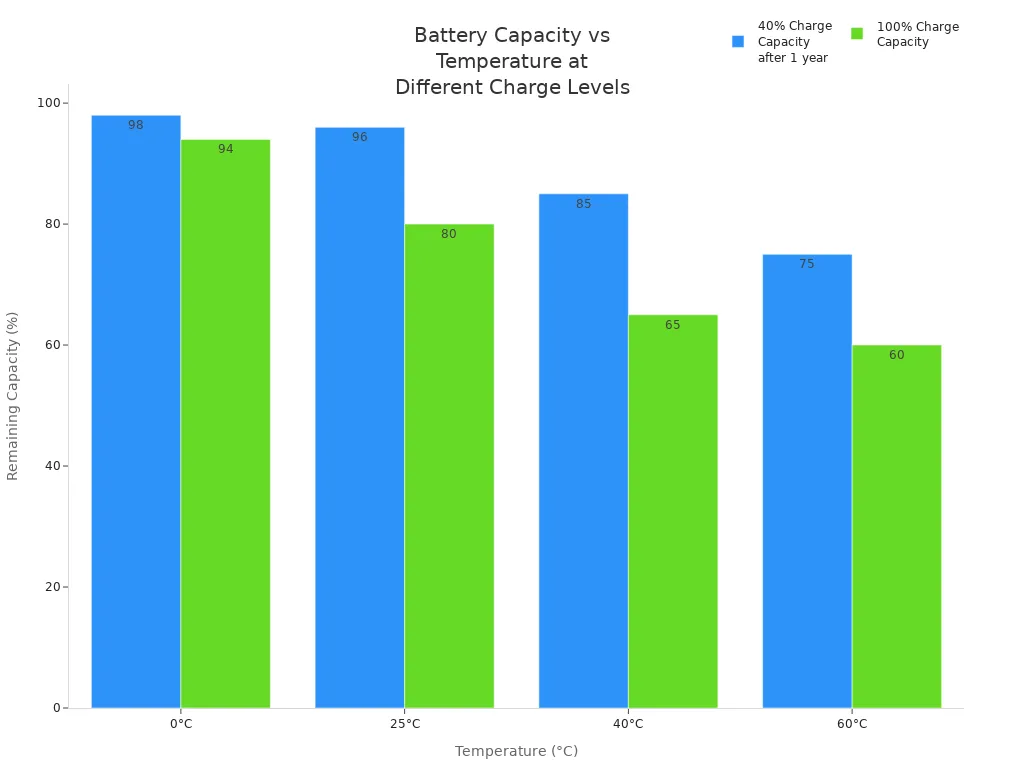
Temperature matters for your battery too. If you keep your device in a hot place, the battery will not last as long. Look at this chart to see how heat changes battery power over time:
As your device gets older, the battery ages too. Every time you use your device, you use up a charging cycle. After many cycles, your battery cannot hold as much power. This is called capacity fade. The battery will not last as long, especially when it is almost empty.
Old batteries also cannot give as much power when you need it. This is called power fade. You might notice this when your battery is at 1%. Your device may turn off faster or not work as well. Heat and charging too fast can make your battery age quicker. The SEI layer inside the battery gets thicker every time you charge it, which makes the battery work less well.
You can slow down battery aging by charging slowly and keeping your device cool. If you use these habits, your lithium-ion battery will last longer.
You learned that the last 1% of your lithium-ion battery is stronger than you thought. Chemistry, smart design, and safety features help the battery work well when power is low. You can make your battery last longer by doing these things:
Keep batteries in cool spots.
Charge them before they run out.
Use the right charger for your device.
Try not to drain batteries all the way.
Remember: Charging a little at a time and keeping batteries cool will help them last longer.
You see your battery stay at 1% because the battery management system protects your device. It keeps a small reserve to avoid sudden shutdowns. This helps you finish tasks before charging again.
You should avoid charging overnight. Charging for too long can cause heat and stress. This lowers battery life. Try charging during the day and unplug when full. Charging in short bursts helps your battery last longer.
Fast charging heats up your battery. You should use fast charging only when needed. Charging slowly keeps your battery healthy. If you use fast charging often, your battery may age faster.
You can keep your battery healthy by charging between 20% and 80%. Charging in small amounts helps. Avoid charging to 100% or letting your battery drop to 0%. Charging in cool places also helps.
If you use fast charging every day, your battery heats up more. This causes faster aging. You should use fast charging only when you need quick power. Charging slowly most of the time keeps your battery strong.